

Mario Kart PC Forum - Advanced search
Results 21-40 out of 180+

What weird quotes do you randomly think of
 20502 pts ★ Legend
 7390 pts ★ Racer
On 2026-01-04 at 15:33:26
ham burger burger ham
On 2024-12-16 at 23:48:27
"cow bicycle"
"hi im kyle and today im gonna be stealing from a corner shop in antarctica"
"hi im kyle and today im gonna be stealing from a corner shop in antarctica"
On 2024-08-03 at 11:43:00
what if your key was colossal?
[Original] Rating Your Circuits from 0-100
On 2026-02-25 at 20:48:46
ns2 koopa beach 2
https://mkpc.malahieude.net/map.php?i=197260
https://mkpc.malahieude.net/map.php?i=197260
Report a Stolen Track Here
On 2024-08-19 at 23:42:07
Retro rewind in mkpc
On 2026-04-09 at 02:06:13
UPDATE VERSION 3.7
added the NS2 Special Cup!
added the NS2 Special Cup!
 5
5On 2026-04-07 at 23:13:28
which version of ns2 mc:
neptunogamer - coin
coolmonkey - smile
neptunogamer - coin
coolmonkey - smile
 4
4 17
17On 2026-04-07 at 17:34:03
I feel like u guys don't play it but still vote. just saying
i mean narios is pretty hard to beat
On 2026-04-07 at 16:56:38
which version is better:
nario85 - coin
-star- - ok
nario85 - coin
-star- - ok
5On 2026-04-07 at 10:26:35
the only thing that you could change is adding the final lap part of the music in the final lap
On 2026-04-06 at 17:00:29
so -star- has reacently made kalimari desert and i wanna know whos is better:
mr quint-coin
-star--smile
mr quint-coin
-star--smile
4On 2026-04-06 at 14:07:41
ive been working on ns2 mc:
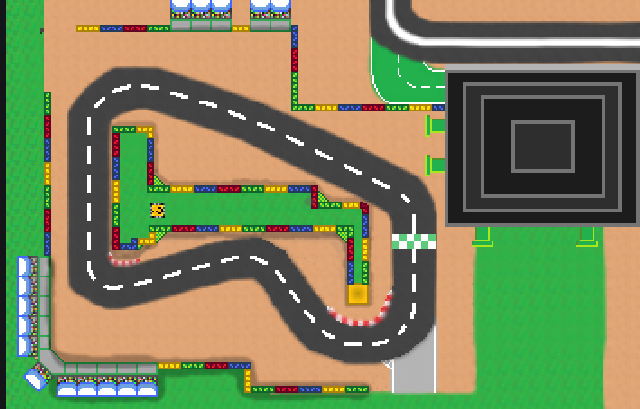
tell me if it looks good
tell me if it looks good
 2
2 5
5 1
1On 2026-04-06 at 12:57:14
Will you accept this track?
My remake of Ghost valley 1
https://mkpc.malahieude.net/map.php?i=220504&collab=EXT8P7ltOSAhaodPKKIo8uY2
My remake of Ghost valley 1
https://mkpc.malahieude.net/map.php?i=220504&collab=EXT8P7ltOSAhaodPKKIo8uY2
no detail in the planks whatsoever and unclear offroad in the shortcut
On 2026-04-06 at 12:30:44
so im thinking of making a discord server for this like i did with pixel kart so if your interested then this is the link:
https://discord.gg/d5mPNvSg3
https://discord.gg/d5mPNvSg3
2 2
2On 2026-04-06 at 01:08:03
I updated the first message with way more yellow squares
On 2026-04-06 at 00:55:43
Everyone, the topic is now unlocked, so we can have more track submissions
21On 2026-04-04 at 22:11:51
I think it's clear to anyone who does online sessions on this multicup that I don't like it, but I thought I'd go through and explain the problems with it. More importantly though, I'd like to be able to help all the different track creators of this multicup to be able to improve, since these tracks generally look like the same quality I had in 2022 when I first joined MKPC, and now my tracks have been able to rise to the quality of the Yoshi Circuit seen in this multicup. I'll go through a list of different problems with these tracks and explain how it can be improved, and once you get those 3 sorted, your tracks will likely be a lot better
1. Pixel Size
A lot of the tracks in this multicup have quite large pixels, which can be problematic, since it then worsens almost every other attribute of a track, such as worse textures, shading, and can even make the gameplay a lot harder to read. This is also a problem for the other end of a scale where the site used for making art has no pixels at all, and are pure drawing focused. Unless you're a master in regular art, these suck for MKPC because the leave the track looking messy. I imagine quite a lot of people here use pixilart, so my recommendation on that site is to use a canvas size around 600x600 (can go a larger size once you get more comfortable with making tracks) then upscale by 2x when exporting the image.
2. Consistency
Another issue in lots of these tracks are that they're quite inconsistent. Some parts may have a width of 48 pixels, while other parts have a 60 pixel width. This causes the visuals to look messy, but also makes gameplay feel weird. This can be dealt with by doing each side of the road as different lines, and using circle tool for making turns, deleting the parts you don't want. It's fine if it's not perfect, but I'd rather it ranging from 48-50 pixels than 48-60 pixels.
3. Textures
I could probably count on my hands how many tracks are actually textured. These are quite simple, but go a long way to making the visuals look way better. You can make these pretty simply by making a texture in a small grid (such as 8x8 or 16x16) on an alternate layer, copy pasting it across the layer, than deleting it in all areas it's not needed in.
Bonus. Paint.net
A bonus tip is that paint.net is a very useful app to be able to make tracks, since it can quite easily deal with all the issues I have presented, since it's not limited by image size so it can handle 1x1 pixels, it's got a built in tool for designing lines (straight and curved) with a consistent width. It also has built in textures that can be applied. It is free to use and the only downside is that it doesn't work on some older computers. Just make sure to turn off anti-aliasing. If you want a full guide on paint.net, react to this message with :rob_dabbing:
1. Pixel Size
A lot of the tracks in this multicup have quite large pixels, which can be problematic, since it then worsens almost every other attribute of a track, such as worse textures, shading, and can even make the gameplay a lot harder to read. This is also a problem for the other end of a scale where the site used for making art has no pixels at all, and are pure drawing focused. Unless you're a master in regular art, these suck for MKPC because the leave the track looking messy. I imagine quite a lot of people here use pixilart, so my recommendation on that site is to use a canvas size around 600x600 (can go a larger size once you get more comfortable with making tracks) then upscale by 2x when exporting the image.
2. Consistency
Another issue in lots of these tracks are that they're quite inconsistent. Some parts may have a width of 48 pixels, while other parts have a 60 pixel width. This causes the visuals to look messy, but also makes gameplay feel weird. This can be dealt with by doing each side of the road as different lines, and using circle tool for making turns, deleting the parts you don't want. It's fine if it's not perfect, but I'd rather it ranging from 48-50 pixels than 48-60 pixels.
3. Textures
I could probably count on my hands how many tracks are actually textured. These are quite simple, but go a long way to making the visuals look way better. You can make these pretty simply by making a texture in a small grid (such as 8x8 or 16x16) on an alternate layer, copy pasting it across the layer, than deleting it in all areas it's not needed in.
Bonus. Paint.net
A bonus tip is that paint.net is a very useful app to be able to make tracks, since it can quite easily deal with all the issues I have presented, since it's not limited by image size so it can handle 1x1 pixels, it's got a built in tool for designing lines (straight and curved) with a consistent width. It also has built in textures that can be applied. It is free to use and the only downside is that it doesn't work on some older computers. Just make sure to turn off anti-aliasing. If you want a full guide on paint.net, react to this message with :rob_dabbing:
what are the top 10 tracks that you think NEED replacing
 2
2On 2026-04-01 at 18:57:47
guys I'm lost what track do I make next
make dk spaceport
 1
1On 2026-04-01 at 14:53:09
moi je propose un très bon remake de circuit Mario 2 de la SNES https://mkpc.malahieude.net/map.php?i=218144
can i have the collb link pls
On 2026-03-31 at 21:01:58
voici un circuit inventé par moi ou j'ai beaucoup travailler j'espère que vous aller adoré https://mkpc.malahieude.net/map.php?i=215002
i really like it but it wont be in the multicup since it isnt a retro track
Je l'aime beaucoup, mais elle ne sera pas en compétition car ce n'est pas un circuit rétro.
 1
1