


what search engine do you use to play MKPC?

Page: 1
 9907 pts ★ Expert
 5467 pts ★ Novice
On 2025-05-23 at 19:08:35
I use Microsoft edge! (Don't hate on me)
On 2025-05-23 at 19:12:12
I use Microsoft edge! (Don't hate on me)
I use Duckduckgo (for the search engine) and firefox for the browser.
On 2025-05-23 at 19:26:12
I use Microsoft edge! (Don't hate on me)
I use Duckduckgo (for the search engine) and firefox for the browser.
Beware that MKPC runs MUCH slower on Firefox than on chromium based browsers. I suggest switching to Ungoogled Chromium for MKPC. You can still use Firefox outside of MKPC, I use that too.
On 2025-05-23 at 19:29:59
I use Microsoft edge! (Don't hate on me)
me too
 so i have no reason to hate on you
 1
1On 2025-05-23 at 19:39:35
I use Microsoft edge! (Don't hate on me)
I use Duckduckgo (for the search engine) and firefox for the browser.
Beware that MKPC runs MUCH slower on Firefox than on chromium based browsers. I suggest switching to Ungoogled Chromium for MKPC. You can still use Firefox outside of MKPC, I use that too.
Ok but I don't have chrome I have safari which bugs quite a bit on my mac and I have firefox they both have Duckduckgo as a search engine
On 2025-05-23 at 20:10:25
I also use Google Chrome
On 2025-05-23 at 20:17:56
I use Microsoft edge! (Don't hate on me)
I actually use three mainline browsers, being Edge, Chrome, and Safari; as well as three system browsers, being 3DS, PS4, and Switch.
On 2025-05-23 at 20:45:08
I use Microsoft edge! (Don't hate on me)
I actually use three mainline browsers, being Edge, Chrome, and Safari; as well as three system browsers, being 3DS, PS4, and Switch.
there's a web browser on switch?
On 2025-05-23 at 20:47:59
I use Microsoft edge! (Don't hate on me)
i also use microsoft edge
On 2025-05-23 at 20:48:52
I use Microsoft edge! (Don't hate on me)
I actually use three mainline browsers, being Edge, Chrome, and Safari; as well as three system browsers, being 3DS, PS4, and Switch.
there's a web browser on switch?
Yes. I just searched it, I'd suggest looking at the AI overview.
On 2025-05-30 at 20:13:27
Which web browser is the fastest for playing mkpc
On 2025-06-01 at 08:46:48
Chrome
On 2025-06-01 at 13:39:01
I use SwitchBru (Switch Browser) and sometimes Safari (on my phone). It depends whether my sister is playing on the Switch or not.
On 2025-06-01 at 15:36:39
I use chrome
Il also look at this for like 10 seconds on the switch browser
Il also look at this for like 10 seconds on the switch browser
On 2025-06-01 at 20:58:45
how are people able the use google on their switch??? 
On 2025-06-01 at 21:19:40
how are people able the use google on their switch???
The Switch Browser.
1. Go on your Switch to the Internet settings.
2. Click on a network that your Switch can connect to.
3. Click Change Settings after you’ve clicked on the network.
4. Go click on DNS settings and enable it to Manual.
5. Change the Primary DNS by clicking on Primary DNS.
6. Once you clicked on the Primary DNS’ button thing type in 45.55.142.122
7. Click Confirm once you put in the DNS.
8. Click Save after you’ve Confirmed the DNS.
9. Once you clicked save, Click on Connect to network.
10. Wait until you see this screen.
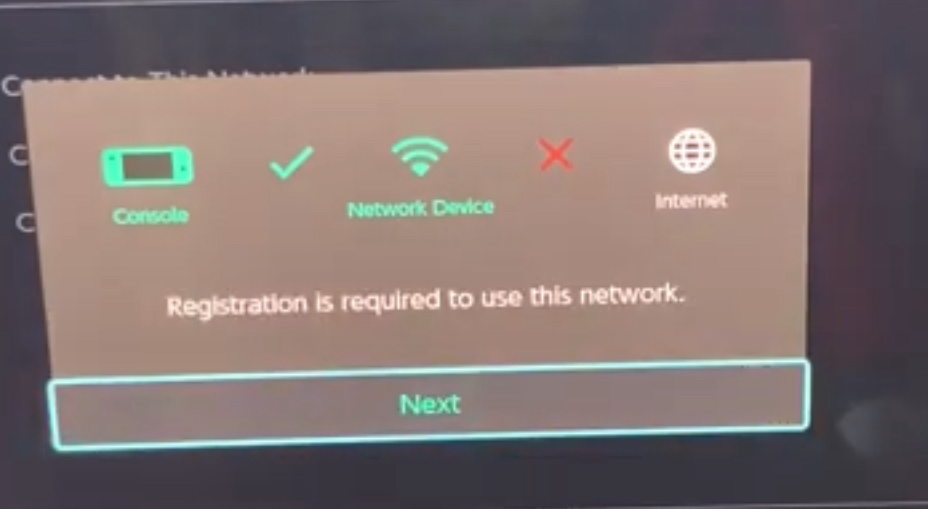
11. Click Next and start browsin’!
On 2025-06-01 at 21:45:59
how are people able the use google on their switch???
The Switch Browser.
1. Go on your Switch to the Internet settings.
2. Click on a network that your Switch can connect to.
3. Click Change Settings after you’ve clicked on the network.
4. Go click on DNS settings and enable it to Manual.
5. Change the Primary DNS by clicking on Primary DNS.
6. Once you clicked on the Primary DNS’ button thing type in 45.55.142.122
7. Click Confirm once you put in the DNS.
8. Click Save after you’ve Confirmed the DNS.
9. Once you clicked save, Click on Connect to network.
10. Wait until you see this screen.
11. Click Next and start browsin’!
to enter the browser you can also press + on the news screen.
 1
1On 2025-06-01 at 23:44:08
how are people able the use google on their switch???
The Switch Browser.
1. Go on your Switch to the Internet settings.
2. Click on a network that your Switch can connect to.
3. Click Change Settings after you’ve clicked on the network.
4. Go click on DNS settings and enable it to Manual.
5. Change the Primary DNS by clicking on Primary DNS.
6. Once you clicked on the Primary DNS’ button thing type in 45.55.142.122
7. Click Confirm once you put in the DNS.
8. Click Save after you’ve Confirmed the DNS.
9. Once you clicked save, Click on Connect to network.
10. Wait until you see this screen.
11. Click Next and start browsin’!
to enter the browser you can also press + on the news screen.
I pressed the + button in the news screen, and it just sends me to the find channels screen.
On 2025-06-02 at 00:58:53
how are people able the use google on their switch???
The Switch Browser.
1. Go on your Switch to the Internet settings.
2. Click on a network that your Switch can connect to.
3. Click Change Settings after you’ve clicked on the network.
4. Go click on DNS settings and enable it to Manual.
5. Change the Primary DNS by clicking on Primary DNS.
6. Once you clicked on the Primary DNS’ button thing type in 45.55.142.122
7. Click Confirm once you put in the DNS.
8. Click Save after you’ve Confirmed the DNS.
9. Once you clicked save, Click on Connect to network.
10. Wait until you see this screen.
11. Click Next and start browsin’!
to enter the browser you can also press + on the news screen.
I pressed the + button in the news screen, and it just sends me to the find channels screen.
i ment for step 9
 1
1Page: 1