

Retro rewind in mkpc

 598 -
598 - 
 21132 pts ★ Legend
 7535 pts ★ Racer
On 2026-04-01 at 18:57:47
guys I'm lost what track do I make next
make dk spaceport
 1
1On 2026-04-04 at 17:15:17
so I've decided to make NS2 Dry Bones Burnout, however I see @SUSSYNATH has already made it...
@SUSSYNATH, would you be fine with me replacing your Dry Bones Burnout?
@SUSSYNATH, est-ce que ça t'irait si je remplaçais ton Dry Bones Burnout ?
On 2026-04-04 at 18:31:50
okay... its up to c@oolmonkey's opinion here...
https://mkpc.malahieude.net/map.php?i=220407&collab=oQBM1_moEjxyBjV2so9PbsRB
is it better than @SUSSYNATH's?
edit: worth a shot ig
https://mkpc.malahieude.net/map.php?i=220407&collab=oQBM1_moEjxyBjV2so9PbsRB
is it better than @SUSSYNATH's?
edit: worth a shot ig
 4
4
On 2026-04-04 at 20:51:58
I think it's clear to anyone who does online sessions on this multicup that I don't like it, but I thought I'd go through and explain the problems with it. More importantly though, I'd like to be able to help all the different track creators of this multicup to be able to improve, since these tracks generally look like the same quality I had in 2022 when I first joined MKPC, and now my tracks have been able to rise to the quality of the Yoshi Circuit seen in this multicup. I'll go through a list of different problems with these tracks and explain how it can be improved, and once you get those 3 sorted, your tracks will likely be a lot better
1. Pixel Size
A lot of the tracks in this multicup have quite large pixels, which can be problematic, since it then worsens almost every other attribute of a track, such as worse textures, shading, and can even make the gameplay a lot harder to read. This is also a problem for the other end of a scale where the site used for making art has no pixels at all, and are pure drawing focused. Unless you're a master in regular art, these suck for MKPC because the leave the track looking messy. I imagine quite a lot of people here use pixilart, so my recommendation on that site is to use a canvas size around 600x600 (can go a larger size once you get more comfortable with making tracks) then upscale by 2x when exporting the image.
2. Consistency
Another issue in lots of these tracks are that they're quite inconsistent. Some parts may have a width of 48 pixels, while other parts have a 60 pixel width. This causes the visuals to look messy, but also makes gameplay feel weird. This can be dealt with by doing each side of the road as different lines, and using circle tool for making turns, deleting the parts you don't want. It's fine if it's not perfect, but I'd rather it ranging from 48-50 pixels than 48-60 pixels.
3. Textures
I could probably count on my hands how many tracks are actually textured. These are quite simple, but go a long way to making the visuals look way better. You can make these pretty simply by making a texture in a small grid (such as 8x8 or 16x16) on an alternate layer, copy pasting it across the layer, than deleting it in all areas it's not needed in.
Bonus. Paint.net
A bonus tip is that paint.net is a very useful app to be able to make tracks, since it can quite easily deal with all the issues I have presented, since it's not limited by image size so it can handle 1x1 pixels, it's got a built in tool for designing lines (straight and curved) with a consistent width. It also has built in textures that can be applied. It is free to use and the only downside is that it doesn't work on some older computers. Just make sure to turn off anti-aliasing. If you want a full guide on paint.net, react to this message with :rob_dabbing:
1. Pixel Size
A lot of the tracks in this multicup have quite large pixels, which can be problematic, since it then worsens almost every other attribute of a track, such as worse textures, shading, and can even make the gameplay a lot harder to read. This is also a problem for the other end of a scale where the site used for making art has no pixels at all, and are pure drawing focused. Unless you're a master in regular art, these suck for MKPC because the leave the track looking messy. I imagine quite a lot of people here use pixilart, so my recommendation on that site is to use a canvas size around 600x600 (can go a larger size once you get more comfortable with making tracks) then upscale by 2x when exporting the image.
2. Consistency
Another issue in lots of these tracks are that they're quite inconsistent. Some parts may have a width of 48 pixels, while other parts have a 60 pixel width. This causes the visuals to look messy, but also makes gameplay feel weird. This can be dealt with by doing each side of the road as different lines, and using circle tool for making turns, deleting the parts you don't want. It's fine if it's not perfect, but I'd rather it ranging from 48-50 pixels than 48-60 pixels.
3. Textures
I could probably count on my hands how many tracks are actually textured. These are quite simple, but go a long way to making the visuals look way better. You can make these pretty simply by making a texture in a small grid (such as 8x8 or 16x16) on an alternate layer, copy pasting it across the layer, than deleting it in all areas it's not needed in.
Bonus. Paint.net
A bonus tip is that paint.net is a very useful app to be able to make tracks, since it can quite easily deal with all the issues I have presented, since it's not limited by image size so it can handle 1x1 pixels, it's got a built in tool for designing lines (straight and curved) with a consistent width. It also has built in textures that can be applied. It is free to use and the only downside is that it doesn't work on some older computers. Just make sure to turn off anti-aliasing. If you want a full guide on paint.net, react to this message with :rob_dabbing:
 7
7 5
5On 2026-04-04 at 22:11:51
I think it's clear to anyone who does online sessions on this multicup that I don't like it, but I thought I'd go through and explain the problems with it. More importantly though, I'd like to be able to help all the different track creators of this multicup to be able to improve, since these tracks generally look like the same quality I had in 2022 when I first joined MKPC, and now my tracks have been able to rise to the quality of the Yoshi Circuit seen in this multicup. I'll go through a list of different problems with these tracks and explain how it can be improved, and once you get those 3 sorted, your tracks will likely be a lot better
1. Pixel Size
A lot of the tracks in this multicup have quite large pixels, which can be problematic, since it then worsens almost every other attribute of a track, such as worse textures, shading, and can even make the gameplay a lot harder to read. This is also a problem for the other end of a scale where the site used for making art has no pixels at all, and are pure drawing focused. Unless you're a master in regular art, these suck for MKPC because the leave the track looking messy. I imagine quite a lot of people here use pixilart, so my recommendation on that site is to use a canvas size around 600x600 (can go a larger size once you get more comfortable with making tracks) then upscale by 2x when exporting the image.
2. Consistency
Another issue in lots of these tracks are that they're quite inconsistent. Some parts may have a width of 48 pixels, while other parts have a 60 pixel width. This causes the visuals to look messy, but also makes gameplay feel weird. This can be dealt with by doing each side of the road as different lines, and using circle tool for making turns, deleting the parts you don't want. It's fine if it's not perfect, but I'd rather it ranging from 48-50 pixels than 48-60 pixels.
3. Textures
I could probably count on my hands how many tracks are actually textured. These are quite simple, but go a long way to making the visuals look way better. You can make these pretty simply by making a texture in a small grid (such as 8x8 or 16x16) on an alternate layer, copy pasting it across the layer, than deleting it in all areas it's not needed in.
Bonus. Paint.net
A bonus tip is that paint.net is a very useful app to be able to make tracks, since it can quite easily deal with all the issues I have presented, since it's not limited by image size so it can handle 1x1 pixels, it's got a built in tool for designing lines (straight and curved) with a consistent width. It also has built in textures that can be applied. It is free to use and the only downside is that it doesn't work on some older computers. Just make sure to turn off anti-aliasing. If you want a full guide on paint.net, react to this message with :rob_dabbing:
1. Pixel Size
A lot of the tracks in this multicup have quite large pixels, which can be problematic, since it then worsens almost every other attribute of a track, such as worse textures, shading, and can even make the gameplay a lot harder to read. This is also a problem for the other end of a scale where the site used for making art has no pixels at all, and are pure drawing focused. Unless you're a master in regular art, these suck for MKPC because the leave the track looking messy. I imagine quite a lot of people here use pixilart, so my recommendation on that site is to use a canvas size around 600x600 (can go a larger size once you get more comfortable with making tracks) then upscale by 2x when exporting the image.
2. Consistency
Another issue in lots of these tracks are that they're quite inconsistent. Some parts may have a width of 48 pixels, while other parts have a 60 pixel width. This causes the visuals to look messy, but also makes gameplay feel weird. This can be dealt with by doing each side of the road as different lines, and using circle tool for making turns, deleting the parts you don't want. It's fine if it's not perfect, but I'd rather it ranging from 48-50 pixels than 48-60 pixels.
3. Textures
I could probably count on my hands how many tracks are actually textured. These are quite simple, but go a long way to making the visuals look way better. You can make these pretty simply by making a texture in a small grid (such as 8x8 or 16x16) on an alternate layer, copy pasting it across the layer, than deleting it in all areas it's not needed in.
Bonus. Paint.net
A bonus tip is that paint.net is a very useful app to be able to make tracks, since it can quite easily deal with all the issues I have presented, since it's not limited by image size so it can handle 1x1 pixels, it's got a built in tool for designing lines (straight and curved) with a consistent width. It also has built in textures that can be applied. It is free to use and the only downside is that it doesn't work on some older computers. Just make sure to turn off anti-aliasing. If you want a full guide on paint.net, react to this message with :rob_dabbing:
what are the top 10 tracks that you think NEED replacing
 2
2

On 2026-04-04 at 23:17:37
y'know what, I now think this is a “quantity over quality” because pixel tracks are overrated, plus some bad quality tracks and pictures, that only took like 10 minutes to make
Its actually not that pixels are overrated, it’s the fact that people just don’t care about the usage of different shades of colors effects the result of a drawing, because they’re lazy. (And that goes to any drawing style.)
5
On 2026-04-05 at 13:37:52
3 2
2
On 2026-04-05 at 15:25:56
3. Textures
I could probably count on my hands how many tracks are actually textured. These are quite simple, but go a long way to making the visuals look way better. You can make these pretty simply by making a texture in a small grid (such as 8x8 or 16x16) on an alternate layer, copy pasting it across the layer, than deleting it in all areas it's not needed in.
I could probably count on my hands how many tracks are actually textured. These are quite simple, but go a long way to making the visuals look way better. You can make these pretty simply by making a texture in a small grid (such as 8x8 or 16x16) on an alternate layer, copy pasting it across the layer, than deleting it in all areas it's not needed in.
I personally use the airbrush/spraypaint tool a lot when making tracks to give them more detail, and I'd say it works well.
On 2026-04-05 at 17:25:34
I'll submit my SNES Mario Circuit 1 here.
https://mkpc.malahieude.net/map.php?i=220466&collab=OepenxWNn9VP-YcXgXtW8mvX
https://mkpc.malahieude.net/map.php?i=220466&collab=OepenxWNn9VP-YcXgXtW8mvX
 1
1Yesterday at 00:55:43
Everyone, the topic is now unlocked, so we can have more track submissions
 2
2 1
1Yesterday at 00:58:09
Happy to be back!
Yesterday at 01:08:03
I updated the first message with way more yellow squares
Yesterday at 01:19:25
I guess I will make Kalamari Desert too
1
Yesterday at 10:38:44
quel circuit Mario Kart 8 Deluxe je peut remake
 1
1Yesterday at 12:30:44
so im thinking of making a discord server for this like i did with pixel kart so if your interested then this is the link:
https://discord.gg/d5mPNvSg3
https://discord.gg/d5mPNvSg3
22
Yesterday at 12:49:08
Will you accept this track?
My remake of Ghost valley 1
https://mkpc.malahieude.net/map.php?i=220504&collab=EXT8P7ltOSAhaodPKKIo8uY2
My remake of Ghost valley 1
https://mkpc.malahieude.net/map.php?i=220504&collab=EXT8P7ltOSAhaodPKKIo8uY2
2Yesterday at 12:57:14
Will you accept this track?
My remake of Ghost valley 1
https://mkpc.malahieude.net/map.php?i=220504&collab=EXT8P7ltOSAhaodPKKIo8uY2
My remake of Ghost valley 1
https://mkpc.malahieude.net/map.php?i=220504&collab=EXT8P7ltOSAhaodPKKIo8uY2
no detail in the planks whatsoever and unclear offroad in the shortcut
Yesterday at 14:07:41
ive been working on ns2 mc:
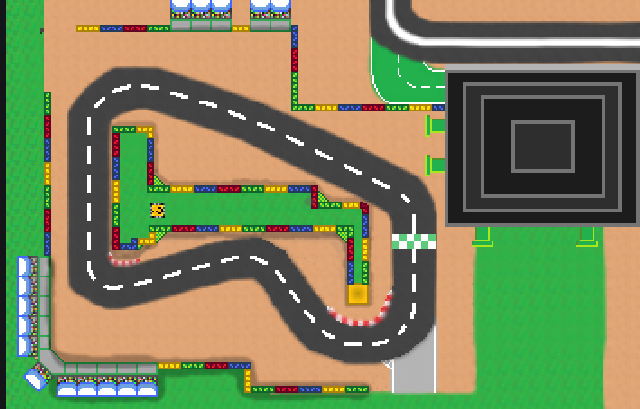
tell me if it looks good
tell me if it looks good
 25
25 1
1